1. Problem Description
Concepts is a word-guessing game where players communicate ideas through visual icons. There are two roles: the Clue-Giver and the Guesser. A shared set of visual icons, each with a known description, is available to both players. Here are some sample icons:

The Clue-Giver first selects a secret, which is a word or phrase, and then provides a hint about it by pointing to an ordered sequence of icons from the shared set — speaking or writing is not allowed.
The order of the icons in the hint is meaningful:
- The first icon typically represents the core idea of the secret.
- The subsequent icons provide supporting context that helps clarify or elaborate on the main concept.
Example 1
The following hint might be interpreted as a place where a job that fights fire takes place — in other words, a fire station:

If the icon order is reversed, it could instead suggest a job that fights fire in a house — pointing to a firefighter:

Example 2
Icons can take on different meanings depending on their context. For example, the heart icon can appear in the following hint, which suggests a tool used by doctors to listen to the heart — a stethoscope:

The same heart icon might instead appear in a hint that implies a fictional character that is both dead and alive — pointing to a zombie:

At Home-Stage, contestants had developed an AI program that predicts outcomes based on a sequence of hints. It's fun. However, your friend has now challenged you:
"Guessing is easy, but can you make an AI system that can give a good clue as well?"
In fact, they further challenged you to see if you can make an AI system that can provide a good clue so that another AI system can guess your keyword!
To make the challenge more interesting, we now play the typical Concept game. To recall, our previous Concept game was simplified so that a clue could only consist of a single sequence of markers.
Now, you may provide up to 4 sequences of markers!
With this, we can express complex ideas better. Considering the following that utilizes 3 sequences of markers to explain a samurai:
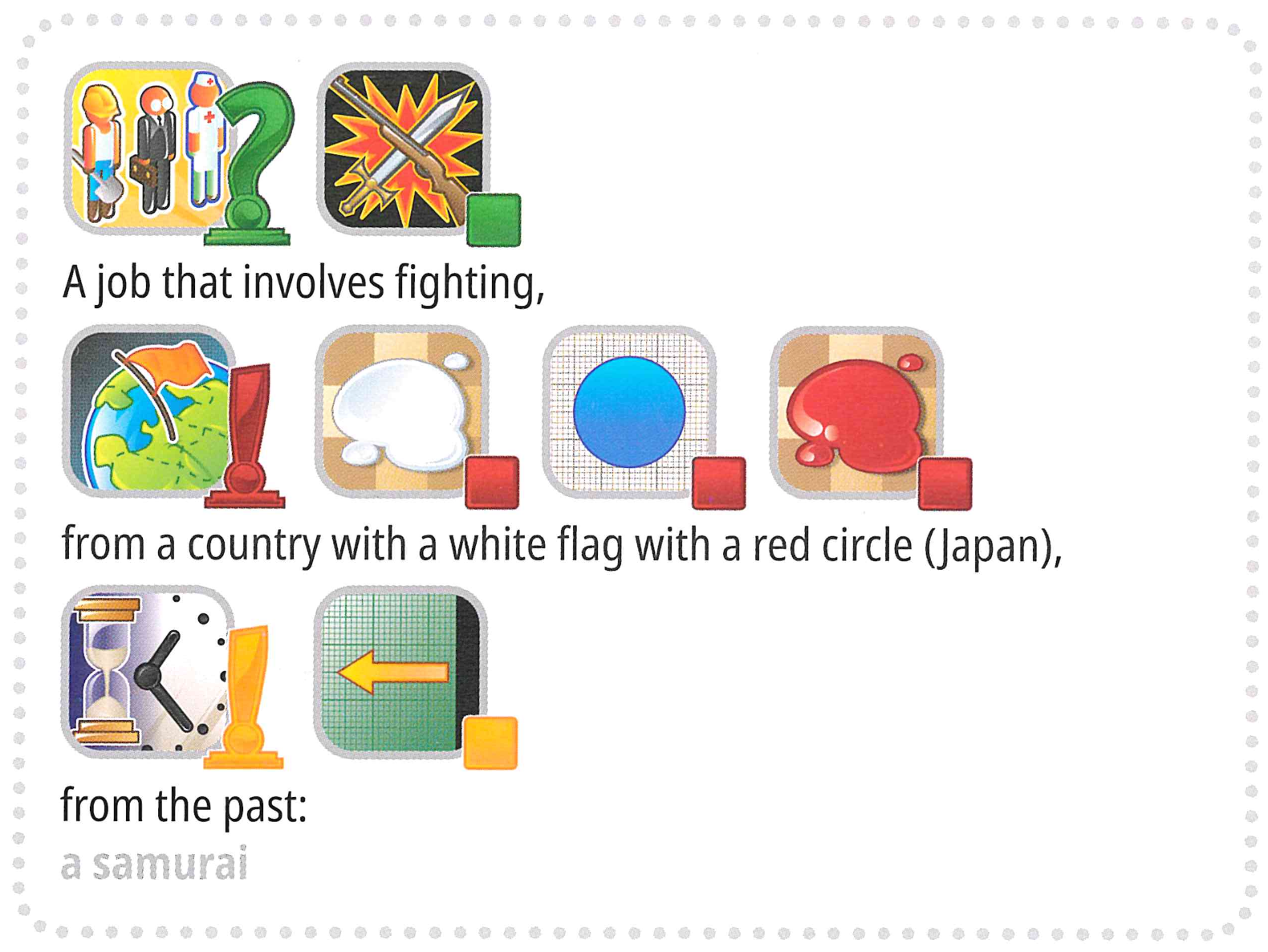
But wait, there's more. To make the challenge even more interesting, the game will now include some keywords that are not typically present in a Concept game, such as "International Olympiad."
Are you up to the challenge?

New AI-Powered Format: We've replaced the human guesser with an AI Guesser. To streamline game play:
- The target word (label) will always be selected from a predefined set (
options). - Hints must be an ordered sequence of markers chosen exclusively from a fixed set of 118 candidate markers.
Terminologies
To ensure clarity and consistency, we are standardizing key terms across all materials.
- label: The target answer (or "secret") to be identified.
- options: The predefined candidate set from which all valid labels are selected.
- marker: An icon representing a concept, accompanied by its text description.
- hints: An ordered sequence of markers provided to the AI guesser to help identify the label.
Your task is to provide hints for each label to help the AI guesser identify it. For example, when the target label is "microphone", your program may generate four hint sequences like:
- Hint 1:
["Object-Box", "Electronic-Computing", "Mouth-Taste", "Ear-Sound-Hearing", "Tool-Construction"] - Hint 2:
["Music-Song", "Television-Program-Show", "Work-Occupation", "Use - Action-Do - Verbe-Button"] - Hint 3:
["Black", "Metal", "Plastic-Rubber", "Cylinder", "Circle-Ring"] - Hint 4:
["Arm-Hand-Finger", "Happy-Positive", "Expression - Quote-Talking-Words", "Life-Heart-Love"]
Note: The above example is for illustrative purposes only. The program should generate lists of IDs but not strings; please refer to both 3. Task and the baseline.ipynb.
2. Dataset
The structure of the provided dataset is as follows:
datasets/
├── train/
│   └── A huggingface dataset
└── hint_descriptions/
    └── A huggingface dataset


os.environ.get("DATA_PATH")/
└── test/
    ├── test_a/
    │   └── A huggingface dataset
    └── test_b/
        └── A huggingface dataset
-
Training set: files in this folder are used for model training. It contains:
train/: A huggingface dataset with a single split'train', with 30 examples, each containing:label: string - the target keyword/answeroptions: sequence of strings - list of 100 possible choices
hint_descriptions/: A huggingface dataset with a single split'train', with 118 markers and their descriptions:ID: int64 - unique identifier for each markerDescription: string - textual description of what the marker representsimage: Image - visual representation of the marker
-
Test sets: Located at
os.environ.get("DATA_PATH")/test/. These will be inaccessible during development and will only be available in the evaluation environment:test_a/: A huggingface dataset with a single split'test'containing 150 examples for leaderboard A evaluationtest_b/: A huggingface dataset with a single split'test'containing 150 examples for final scoring Both test datasets contain the same structure as the training set (labelandoptionsfields).
3. Task
Your task is to provide hint for each label to help the AI guesser identify it. You are required to develop a program that takes two inputs:
- A string
label(your secret label) - The
optionslist (100 candidate choices for the guesser)
The label is guaranteed to be one of the options.
Additionally, the program will utilize the predefined candidate markers.
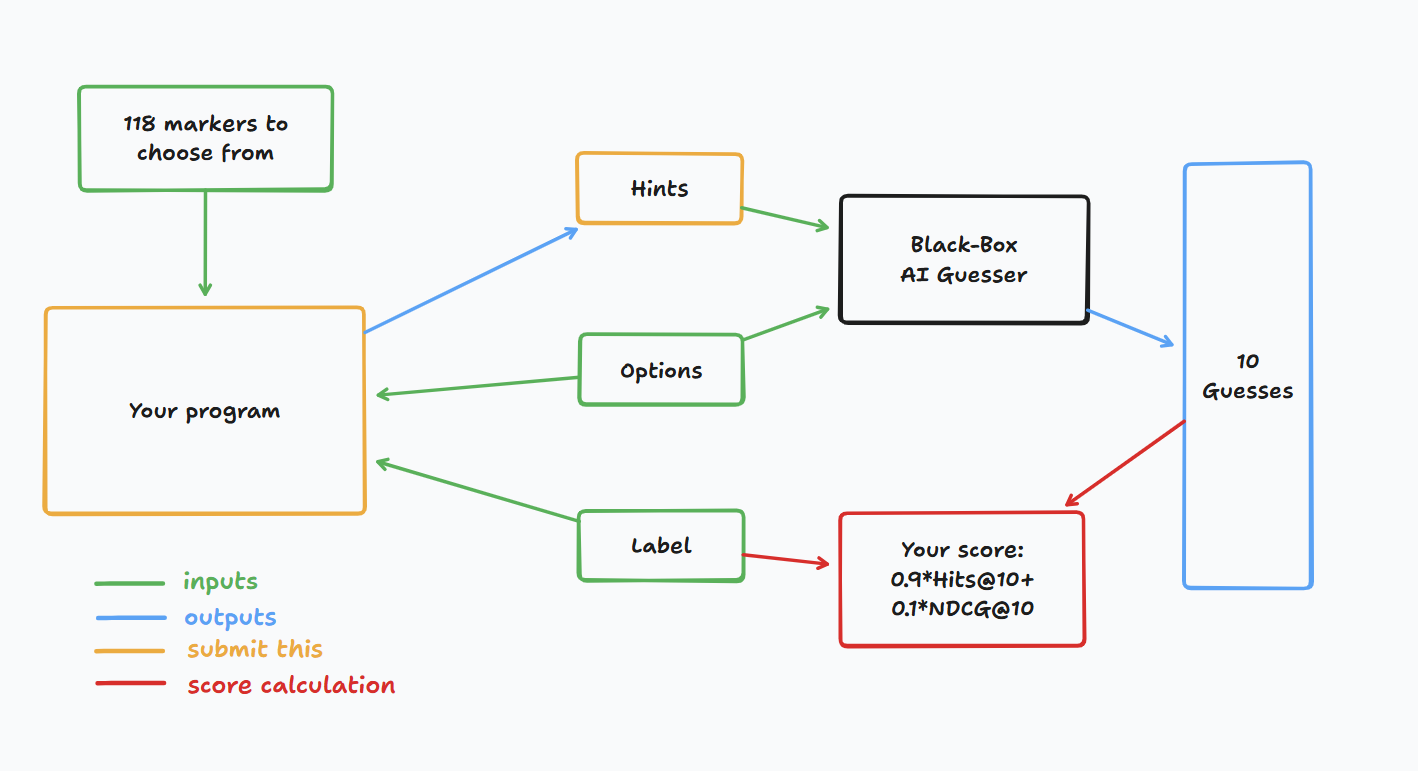
This program should return a list of lists of integers for each label, representing the hints(i.e. the sequences of markers). Specifically:
- The returned list must contain no more than 4 sequences.
- Each sequence can contain up to 8 integers.
- Each integer represents the ID of a marker in the clue.
Your hints will then be given to a black-box AI guesser. You will score a point if the black-box AI guesser can correctly guess your secret keyword based on your hints.
4. Submission
Submit a notebook that generates submission.zip, which includes clues_a.jsonl and clues_b.jsonl, the clues for testset a and b, respectively, in json format. Refer to the baseline notebook for how to generate these files and the specific structure of the jsonl files. Please make sure to follow the naming and structuring conventions.
Contestants may submit model files. If submitting model files, contestants must create a corresponding dataset on the Bohrium platform. Only one dataset can be submitted for this task, and its size must not exceed 2GB. Preloaded datasets and models will be automatically mounted on the test machine, eliminating the need for manual mounting during submission.
Additionally, contestants are permitted to use larger external models to assist in developing their submission.
5. Scoring
Your clue is evaluated using two metrics:
Hits@10
= 1 if the secret word is in the top 10 guesses from the AI, else 0.
NDCG@10 (Normalized Discounted Cumulative Gain)
Rewards the correct guess more if it appears higher in the list.
If the secret word is at rank i (1-based):
Examples:
- Rank 1 → 1.00
- Rank 2 → ~0.63
- Rank 4 → ~0.43
- Rank 10 → ~0.29
Final Score
Your final score will be a combination of both, specifically, it will be 0.9 Hits@10 + 0.1 NDCG@10.
The scoring means that you'll get a significant point as long as the guesser can guess the secret keyword correctly, but more point is given if the guesser can predict the secret keyword earlier.
6. Baseline & Available Tools
- Below you can find the baseline solution.
- The training set and pretrained models are in
training_setfolder. - The highest score by the Scientific Committee for this task is 0.54, this score is used for score unification.
- The baseline score by the Scientific Committee for this task is 0.20, this score is used for score unification.
AI-Guesser API
You can assess the AI-guesser for you to play around with. See the following code on how to access the guesser. It is recommended to implement exponential retry logic as network failures might occur.
guesser_response = httpx.post(f"{API_URL}/guess", json={
    "clues": clues,
    "options": options
    }, headers={
        "Authorization": f"Bearer {SCORER_API_KEY}"
    }, timeout=60).json()
Important: The AI-Guesser API will not be available on the inference machines. In other words, do NOT call the api in your submission notebooks. This is only for you to validate/train your model locally. You may attach your model weights, training data, etc. via a Bohrium dataset. Refer to the Requirements section.
Environment
We installed vllm, sglang and unsloth in environment for LLM inference and fine tuning.
Additionally, we provide access to the following huggingface models via a training_set:
Embedding Models
sentence-transformers/all-MiniLM-L6-v2
sentence-transformers/all-MiniLM-L12-v2
sentence-transformers/all-mpnet-base-v2
sentence-transformers/paraphrase-mpnet-base-v2
sentence-transformers/paraphrase-MiniLM-L6-v2
intfloat/e5-small
intfloat/e5-base
intfloat/e5-large
intfloat/e5-small-v2
intfloat/e5-base-v2
intfloat/e5-large-v2
intfloat/multilingual-e5-small
intfloat/multilingual-e5-base
Alibaba-NLP/gte-modernbert-base
Snowflake/snowflake-arctic-embed-xs
Snowflake/snowflake-arctic-embed-s
Snowflake/snowflake-arctic-embed-m
Snowflake/snowflake-arctic-embed-m-long
Snowflake/snowflake-arctic-embed-l
BAAI/bge-large-en
BAAI/bge-base-en
BAAI/bge-small-en
BAAI/bge-large-en-v1.5
BAAI/bge-base-en-v1.5
BAAI/bge-small-en-v1.5
WhereIsAI/UAE-Large-V1
mixedbread-ai/mxbai-embed-large-v1
Small LLMs
Qwen/Qwen3-0.6B
Qwen/Qwen2.5-0.5B
Qwen/Qwen2.5-0.5B-Instruct
unsloth/Qwen3-0.6B
facebook/opt-350m
facebook/opt-125m
7. Requirements
Overall Requirements
- Maximum submission limit: 15 times. Only successful submissions (i.e., those receive a score on Leaderboard A) will be counted toward the submission limit.
- Testing environment restrictions: The test machine will run your Notebook within 10 minutes. If the execution time exceeds 10 minutes, the system will forcibly terminate and return a feedback of “Timeout” or “Failed”.
- Data and model submission: In this task, contestants should submit a Notebook and have the option to submit 1 attached dataset generated by themselves. The dataset must not exceed
2GBin total size. You are warned that attaching a very large dataset might prolong the testing process, as the dataset needs to be mounted to the inference machine. While this process does not count towards the execution time limit, it will take longer for you to be able to see and select your submissions. - Network: For the on-site stage, the test machine cannot connect to the internet. In other words, downloading commands such as 'pip' and 'conda' or trying to call APIs will not work. Specific to this problem, the testing machines cannot access the guessor API nor the LLM proxy.
API Access Limitations
Your token will grant you 12,500 POST requests to /guess endpoint of the AI-guesser API.
-
If successful, this will return a dictionary in the form
{'guesses': ['firefighter', 'fire inspector', 'fire marshal', 'fire warden', 'fire safety officer', 'smokejumper', 'pyrotechnician', 'firewatcher', 'chef', 'cook'], 'message': 'Generated 10 guesses'}. -
If unsuccessful, this will either raise an
HTTPStatusErrorand return{'detail': 'error message'}, or return{'guesses': [], 'message': 'unable to generate guesses'}. -
Usually, the former is because you have exceeded the 12,500 limit of your token, or you tried to make more than 1000 requests within 1 minute, and the latter is because your clues exceeded 4 sequences or exceeded 8 markers in 1 sequence.
-
Refer to the error message for details.
-
During extremely high load (expected in the last hour of the competition), there might be 1-2 failures in 1000 requests, 'retry' mechanism is provided in baseline.ipynb.
Imports
import vllm
from vllm import LLM, SamplingParams
from vllm.sampling_params import GuidedDecodingParams
from pydantic import BaseModel
import random
import numpy as np
import torch

seed = 42

random.seed(seed)                  # Python built-in random
np.random.seed(seed)               # NumPy
torch.manual_seed(seed)            # PyTorch (CPU)
torch.cuda.manual_seed(seed)       # PyTorch (single GPU)
torch.cuda.manual_seed_all(seed)   # PyTorch (all GPUs)

# Ensures deterministic behavior
torch.backends.cudnn.deterministic = True
torch.backends.cudnn.benchmark = False
Note on Output Determinism
In the above code block, we fix the random seed to ensure that results are reproducible when running the baseline model alone. This is a common practice to eliminate output variance caused by stochastic operations. However, in this specific task, your model is required to interact dynamically with an AI guesser. The guesser is powered by a large language model, which may produce different responses to the same input due to inherent randomness in its decoding process. Therefore, even when given the same set of hints, the guesser’s answers may vary across runs. As a result, you may observe fluctuations in the reported scores across multiple identical submissions. This is expected behavior and does not indicate a bug in the evaluation system.
Accessing AI-Guesser
You can asses the AI-guesser for you to play around with, through the API_URL server. See the following code on how to access the guesser.
Your token will grant you POST requests to /guess. You will also be limited to calls per minute.
'''
API_URL = "https://concepts-judge-server-production-1188.up.railway.app"
# During the competition, this url was notaccessible on the inference/testing machines.
# The testing machines used a secret url to do call API for evalutaion.
SCORER_API_KEY = "sk-ioai-xxx" # During the competition, each contestant was provided a custom `sk-IOAI-` token.
'''

# The API server is now down. We have provided a `judge_api.py` script that you can use to simulate calling the api.
from judge_api import guess
import math, random
# import httpx

# from tenacity import retry, stop_after_attempt, wait_exponential, retry_if_exception_type, retry_if_exception

class GameClient:
    def ndcg_at_10(self, predictions, correct_answer):
        if correct_answer not in predictions:
            return 0.0
        try:
            rank = predictions[:10].index(correct_answer) + 1
        except ValueError:
            return 0.0

        return 1 / math.log2(rank + 1)

    def hits_at_10(self, predictions, correct_answer):
        return 1.0 if correct_answer in predictions[:10] else 0.0

    def __init__(self):
        self._random_options = ['gym', 'dinosaur', 'camel', 'desk', 'chicken', 'suitcase', 'thief', 'penguin', 'bat', 'painter', 'yogurt', 'chocolate', 'football', 'wallet', 'magician', 'shoes', 'bank', 'church', 'chewing gum', 'fashion', 'chainsaw', 'escalator', 'scarf', 'lawyer', 'eagle', 'credit card', 'garden hose', 'glider', 'crosswalk', 'subway', 'fireworks', 'marshmallow', 'cookies', 'curtains', 'dining room', 'cars', 'wedding', 'guitar', 'coffee', 'mouse', 'meat', 'scale', 'train tracks', 'zebra', 'fairy', 'quit', 'museum', 'kangaroo', 'surfboard', 'cheese', 'nightmare', 'jellyfish', 'koala', 'strawberry', 'tiger', 'mailbox', 'kettle', 'potato', 'janitor', 'lighthouse', 'crocodile', 'charger', 'doctor', 'peacock', 'peanut', 'popcorn', 't-shirt', 'fertilizer', 'keyboard', 'umbrella', 'pool', 'watercolor', 'mango', 'xylophone', 'bathroom', 'ice cube', 'giraffe', 'garage', 'cabin', 'plankton', 'pig', 'vulture', 'frame', 'polar bear', 'microscope', 'snake', 'skeleton', 'rocket', 'backpack', 'jacket', 'bedroom', 'castle', 'horse', 'dragonfly', 'hotel', 'cyclist', 'mask', 'restaurant', 'toothpaste', 'angel', 'whistle', 'wrestling', 'eclipse', 'hermit crabs', 'horn', 'boxers', 'volcano', 'fire station', 'toothbrush', 'egg', 'straw', 'rice', 'diamond', 'vitamins', 'tricycle', 'bottle-opener', 'panther', 'ice skates', 'theater', 'gas mask', 'game console', 'path', 'scorpion', 'snowboard', 'crab', 'pie', 'octopus', 'mustache', 'pepper grinder', 'swings', 'palm tree', 'well', 'sewing machine', 'key', 'station', 'mosque', 'chameleon', 'cherry', 'parrot', 'leggings', 'radio', 'brick', 'sunflower', 'hammer', 'carrot', 'radar', 'kite', 'bathtub', 'rhinoceros', 'spoon', 'orchestra', 'gravity', 'flute', 'lipstick', 'school', 'meteorite', 'politician', 'ladder', 'lawnmower', 'computer', 'wheel', 'airport', 'firefighter', 'porch', 'police station', 'queen', 'mayonnaise', 'alumunium foil', 'lion', 'helmet', 'teacher', 'tea', 'fan', 'piano', 'snail', 'farmer', 'harbor', 'nurse', 'sunglasses', 'bee', 'postal worker', 'market', 'plank', 'steering wheel', 'squirrel', 'netting', 'dragon', 'cafeteria', 'millennium', 'spinach', 'fork', 'cabbage', 'ping-pong', 'lock', 'submarine', 'dictionary', 'vaccine', 'soda', 'skirt', 'toaster', 'shorts', 'circus', 'flowerpot', 'lobster', 'rainbow', 'cockroach', 'frog', 'basket ball', 'chilli pepper', 'pajamas', 'crossword', 'light bulb', 'drill', 'beaver', 'daisy', 'river', 'yo-yo', 'harmonica', 'soap', 'igloo', 'sausage', 'deer', 'sailboat', 'fish', 'mosquito', 'can', 'rat', 'frying pan', 'barcode', 'sunscreen', 'ferret', 'whale', 'duck', 'shirt', 'vacuum', 'detective', 'perfume', 'seal', 'raincoat', 'alien', 'bull', 'nest', 'butterfly', 'eraser', 'hedgehog', 'panda', 'refrigerator', 'monocle', 'window', 'kitchen', 'mole', 'speaker', 'waiter', 'salad', 'dolphin', 'storm', 'drums', 'spiderweb', 'bicycle', 'monkey', 'flamingo', 'prison', 'bowling', 'pencil sharpner', 'photo', 'printer', 'robe', 'seahorse', 'doorbell', 'gloves', 'alcohol', 'diving suit', 'shotgun', 'hairbrush', 'cactus', 'ambulance', 'hula hoop', 'snowman', 'mountain', 'unicorn', 'suit', 'cake', 'cow', 'sled', 'boar', 'barbecue', 'trash can', 'slingshot', 'banana', 'dam', 'hat', 'milk', 'shell', 'broom', 'fisherman', 'bucket', 'bell', 'tracktor', 'fly', 'spider', 'carpet', 'coconut tree', 'movie theater', 'socks', 'soldier', 'watering can', 'accountant', 'microphone', 'toothpick', 'wolf', 'trumpet', 'apple', 'library', 'cork', 'zipper', 'pan', 'doghouse', 'dynamite', 'swan', 'grasshopper', 'beach', 'starfish', 'police officer', 'board game', 'magnet', 'cucumber', 'fire extinguisher', 'sundial', 'mechanic', 'lighter', 'shovel', 'shark', 'notebook', 'ostrich', 'bodyguard', 'binoculars', 'parachute', 'drone', 'kiwi', 'ghost', 'baker', 'robot', 'postcard', 'horseshoe', 'karaoke', 'billiards', 'palace', 'hospital', 'compass', 'truck', 'holiday', 'lake', 'cave', 'space station', 'mushroom', 'magnifying glass', 'fox', 'bread', 'rose', 'windmill', 'pirate', 'earring', 'hunter', 'princess', 'calculator', 'clown', 'watch', 'pilot', 'mustard', 'swordfish', 'darts', 'microwave oven', 'plumber', 'sword']

    # @retry(
    #     stop=stop_after_attempt(3),
    #     wait=wait_exponential(multiplier=1, min=4, max=10),
    #     retry=retry_if_exception_type((httpx.TimeoutException, httpx.ConnectError, httpx.RequestError)) |
    #           retry_if_exception(lambda e: isinstance(e, httpx.HTTPStatusError) and e.response.is_server_error) # Retry on connection errors or server side errors.
    # )
    # def _make_api_call(self, clues, options):
    #     response = httpx.post(f"{API_URL}/guess", json={
    #         "clues": clues,
    #         "options": options
    #         }, headers={
    #             "Authorization": f"Bearer {SCORER_API_KEY}"
    #         }, timeout=60)

    #     response.raise_for_status()

    #     guesser_response = response.json()

    #     if "guesses" not in guesser_response:
    #         raise ValueError(f"Unable to generate guesses: {guesser_response}")
    #     if not isinstance(guesser_response["guesses"], list):
    #         raise ValueError(f"Guesses is not a list: {guesser_response}")

    #     return guesser_response
    def _make_api_call(self, clues, options):
        return guess(clues, options)

    def simulate_game(self, clues, expected_answer, distractors = []):
        expected_answer = expected_answer.lower()
        if expected_answer in distractors:
            options = []
        else:
            options = [expected_answer]
        if len(distractors) > 0:
            options.extend([d.lower() for d in distractors])
        options = options[:100]

        # fill in options until the size is 100 with random options
        # set seed based on the expected_answers
        if len(options) < 100:
            random.seed(expected_answer)
            options.extend(random.choices(self._random_options, k=100-len(options)))
            # then shuffle
            random.shuffle(options)

        try:
            predictions = self._make_api_call(clues, options)
            return {
                "predictions": predictions,
                "hit@10": self.hits_at_10(predictions, expected_answer),
                "NDCG@10": self.ndcg_at_10(predictions, expected_answer)
            }

        except Exception as e:

            # if isinstance(e, httpx.HTTPStatusError):
            #     print(f"HTTP Status Error {e.response.status_code}: {e.response.text}")
            #     try:
            #         error_detail = e.response.json().get("detail", "Unknown error")
            #         print(f"Error details: {error_detail}")
            #     except:
            #         print(f"Could not parse error response {e.response.text}")

            # elif isinstance(e, ValueError):
            #     print(f"Value error: {e}")

            # elif isinstance(e, httpx.TimeoutException):
            #     print("request timed out after retries")

            # elif isinstance(e, httpx.ConnectError):
            #     print(f"Could not connect to {API_URL} after retries")

            # elif isinstance(e, httpx.RequestError):
            #     print(f"Request error after retries: {e}")

            # else:
            #     print(f"Unknown error: {e}")

            return {
                "predictions": [],
                "hit@10": 0.0,
                "NDCG@10": 0.0
            }
game_client = GameClient()

# the clue for samurai
clue = [[4, 35],
        [16, 116, 85, 106],
        [43, 102]]

# You can refer to the following code for calling the judge api. Don't forget to comment out this part before submission, otherwise your notebook will not run.
# you can call simulate game, given your clues and the expected answer.
# the game client will randomly generate 100 options.
# The answer will be automatically added as one of the options.
# note that capitalization does not matter, the client will treat all texts as lowercase.
prediction = game_client.simulate_game(clue, "Samurai")

# it will print the prediction, as well as the score of the prediction (more later)
print(prediction)

# you might also want to put your own distractors, which will be added into the set of options.
# It will randomly fill in the rest of options until it has 100 options
prediction = game_client.simulate_game(clue, "Samurai",
                                       distractors=['cat', 'dog', 'castle', 'blacksmith', 'martial artist', 'hunter',
                                                    'warrior', 'knight', 'viking', 'janissary', 'chevalier', 'imperial guard', 'swordsman', 'gladiator', 'marksman', 'police officer'])
print(prediction)
Data Loading
from datasets import load_dataset
DESCRIPTIONS_PATH = "IOAI-official/ioai2025-onsite-concepts-hint-descriptions"

hint_descriptions = load_dataset(DESCRIPTIONS_PATH)['train']
hint_descriptions = {
    x['ID']: {'description': x['Description'], 'icons': x['image']}
    for x in hint_descriptions
}
valid_hints = [x['description'] for x in hint_descriptions.values()]
hint_to_id = {
    x['description']: xid
    for xid, x in hint_descriptions.items()
}

print(valid_hints)
print(hint_to_id)
TRAINING_SET = "IOAI-official/ioai2025-onsite-concepts-train"
dev = load_dataset(TRAINING_SET)['train']
print(dev)
print(dev[0])
from typing import Literal, List, Optional
ValidHint = Literal[*valid_hints]

class Hints(BaseModel):
    hints_1: List[ValidHint]
    hints_2: List[ValidHint]
    hints_3: List[ValidHint]
    hints_4: List[ValidHint]

    def to_result(self):
        hints = [self.hints_1, self.hints_2, self.hints_3, self.hints_4]
        result = []
        for hintlist in hints:
            cur_hintlist = [hint_to_id[hint] for hint in hintlist[:8]]
            result.append(cur_hintlist)
        return result

class ClueGiver:
    def __init__(self):
        self.llm = LLM("facebook/opt-125m")
        # Some models were available to the contestants, as listed above.
        json_schema = Hints.model_json_schema()
        self.sampling_params = SamplingParams(
            guided_decoding=GuidedDecodingParams(
                json=json_schema,
            ),
            max_tokens=5096,
            frequency_penalty=0.5,
            presence_penalty=0.8
        )

    def construct_clues(self, answers: List[str], options: List[List[str]]):
        prompts = []
        for answer, options in zip(answers, options):
            prompt = (
                f"Your valid list of clues are: {valid_hints}. "
                "Your job is a clue giver. You will help the guesser pick the correct answer from a range of options."
                "You must output at least 1 hint and at most 8 hints for each sequence. "
                "Please output a json object with the key 'hints_1', 'hints_2', 'hints_3', and 'hints_4', and the value being a list of hints. "
                "Example: {"
                "'hints_1': [\"Work\\nOccupation\", \"Idea\\nIntelligence\\nConcept\"], "
                "'hints_2': [\"Fauna\\nAnimal\", \"Flora\\nPlant\\nNature\"], "
                "'hints_3': [\"Object\\nBox\", \"Art\\nSculpture - Painting\\nDrawing - Cartoon\"], "
                "'hints_4': [\"Work\\nOccupation\", \"Idea\\nIntelligence\\nConcept\"]"
                "}"
                f"The options the guesser has to choose from are: {options}."
                f"Please construct sequences of hints that are most relevant to the answer {answer}. "
            )
            prompts.append(prompt)
        # batch mode: pass a list of prompts
        hints_batch = self.llm.generate(prompts=prompts, sampling_params=self.sampling_params)
        results = []
        for i, hints in enumerate(hints_batch):
            # print(hints.outputs)
            # print(f"len of token ids: {len(hints.outputs[0].token_ids)}")
            txt = hints.outputs[0].text
            # print(txt)
            try:
                hints_obj = Hints.model_validate_json(txt)
                results.append(hints_obj.to_result())
            except Exception as e:
                print(f"Error parsing hints for answer {answers[i]}: {e}")
                results.append([[1,2,3,4]])
        return results
clue_giver = ClueGiver()
res_clues = clue_giver.construct_clues([x['label'] for x in dev], [x['options'] for x in dev])
# You may use the following code to evaluate your model. Don't forget to comment out this section before submission, as the inference machine will not have access to the judge api.
from tqdm import tqdm
from concurrent.futures import ThreadPoolExecutor, as_completed

def simulate_one(i_data):
    i, data = i_data
    clues = res_clues[i]
    prediction = game_client.simulate_game(clues, data['label'])
    return prediction

predictions = []
with ThreadPoolExecutor() as executor:
    futures = [executor.submit(simulate_one, (i, data)) for i, data in enumerate(dev)]
    for f in tqdm(as_completed(futures), total=len(futures)):
        predictions.append(f.result())

print("Final Score: ")
print(sum([p['hit@10'] for p in predictions]) * 0.9 + sum([p['NDCG@10'] for p in predictions]) * 0.1)
Clean Gpu Cache
import torch

del clue_giver

torch.cuda.empty_cache()
Submission
You do not have to submit your training notebook (you can if you would like to). For resource-efficiency and reliability reasons, we encourage you to upload your trained model weights (if you have one) attached to your submission notebook, instead of submitting your entire training process. For help with submitting model weight files, refer to section 5 in the Bohrium Guide. Your submission notebook only has to include the test inference section below.
You need to save your answers to testset A and testset B in separate jsonl files, clues_a.jsonl and clues_b.jsonl, as shown below. clues_a and clues_b should be lists of clues (each clue being a list of lists of integers). You need to zip the files together into submission.zip. The file names are important. You must follow the naming conventions otherwise the evaluation script will not be able to find your answers.
clue_giver = ClueGiver() # Initialize your model. You can load model weights here.
# Note: both of these datasets were hidden from the contestants during the competition
VALIDATION_SET = "IOAI-official/ioai2025-onsite-concepts-validation"
TESTING_SET = "IOAI-official/ioai2025-onsite-concepts-test"

testset_a = load_dataset(VALIDATION_SET)["test"]
testset_b = load_dataset(TESTING_SET)["test"]
clues_a = clue_giver.construct_clues([x['label'] for x in testset_a], [x['options'] for x in testset_a])
clues_b = clue_giver.construct_clues([x['label'] for x in testset_b], [x['options'] for x in testset_b])
# import zipfile
import json
import os

OUTPUT_DIR = "out"

def write_clues(clues: List[List[List[int]]], path: str):
    with open(path, 'w') as f:
        for c in clues:
            f.write(json.dumps(c) + '\n')

os.makedirs(OUTPUT_DIR, exist_ok=True)
write_clues(clues_a, OUTPUT_DIR + "/clues_a.jsonl")
write_clues(clues_b, OUTPUT_DIR + "/clues_b.jsonl")

# Contestants were required to submit their clues in a zip file
# with zipfile.ZipFile('submission.zip', 'w') as zipf:
#     zipf.write('clues_a.jsonl')
#     zipf.write('clues_b.jsonl')
import torch

del clue_giver
torch.cuda.empty_cache()